TI CC Series Radios Troubleshooting
Use this page for failures below the Zigbee network layer: missing serial ports, flashing errors, an inaccessible ROM bootloader or firmware that does not respond over ZNP.
The LED only blinks
The factory blink program is a hardware sanity check, not coordinator firmware. Install the correct image using the Radio Sticks Getting Started Guide or Radio HATs Getting Started Guide.
The serial port does not appear
zzh Stick
zzh uses a CH340 bridge. On Linux, dmesg should report a ch341-uart converter; on Windows, a port should appear under Ports (COM & LPT).

If Windows does not install the device automatically, use the CH340/CH341 driver from WCH.
zzhp Stick
Current desktop operating systems normally include or obtain the appropriate USB serial driver. If Windows does not create a COM port, inspect the hardware ID in Device Manager and install the bridge manufacturer's signed driver for that board revision.
zoe and zoe2 HATs
The HATs do not enumerate as USB devices. Verify that /dev/serial0 exists, the serial hardware is enabled and the Linux serial console is disabled. Follow the Radio HATs guide.
cc2538-bsl times out
Timeout waiting for ACK/NACK after 'Synch' normally means the wrong port was selected, another application has the port open or the ROM bootloader is not active.
For a manual BSL sequence:
- Remove power from the board.
- Hold the BSL button.
- Apply power while continuing to hold it.
- Wait a few seconds, then release it.
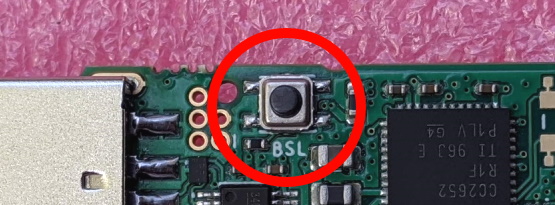
On a board still running the blink test, the LED should stop blinking in BSL mode.
SmartRF Flash Programmer errors
No response from device means the selected serial port is wrong or the board did not enter BSL mode.
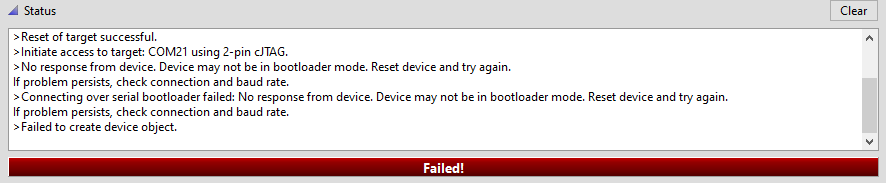
Failed to open file can occur in older versions when a path contains non-ASCII characters. Move the image to a simple path such as C:\firmware.hex.
Verify ZNP coordinator firmware
The znp-uart-test.py script sends a small ZNP command and checks the response. Change its port to match the radio and install pyserial if required:
python -m pip install pyserial
A pass confirms that the port and coordinator firmware respond. A failure can mean the wrong port, competing port ownership or an unsuccessful flash.
Bootloader configuration
The TI ROM bootloader uses an active-low backdoor pin selected by the firmware configuration:
DIO_13on CC2652R/zzhDIO_15on CC2652P or CC1352P boards such as zzhp and zoe2
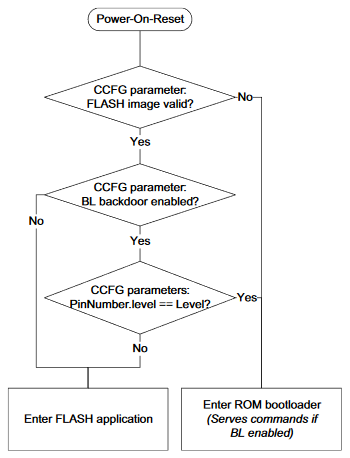
An image built for a different target can move or disable that pin. If the physical BSL button stopped working immediately after an incompatible image was installed, use an external debugger to erase and restore a known-good image.
External debugger recovery
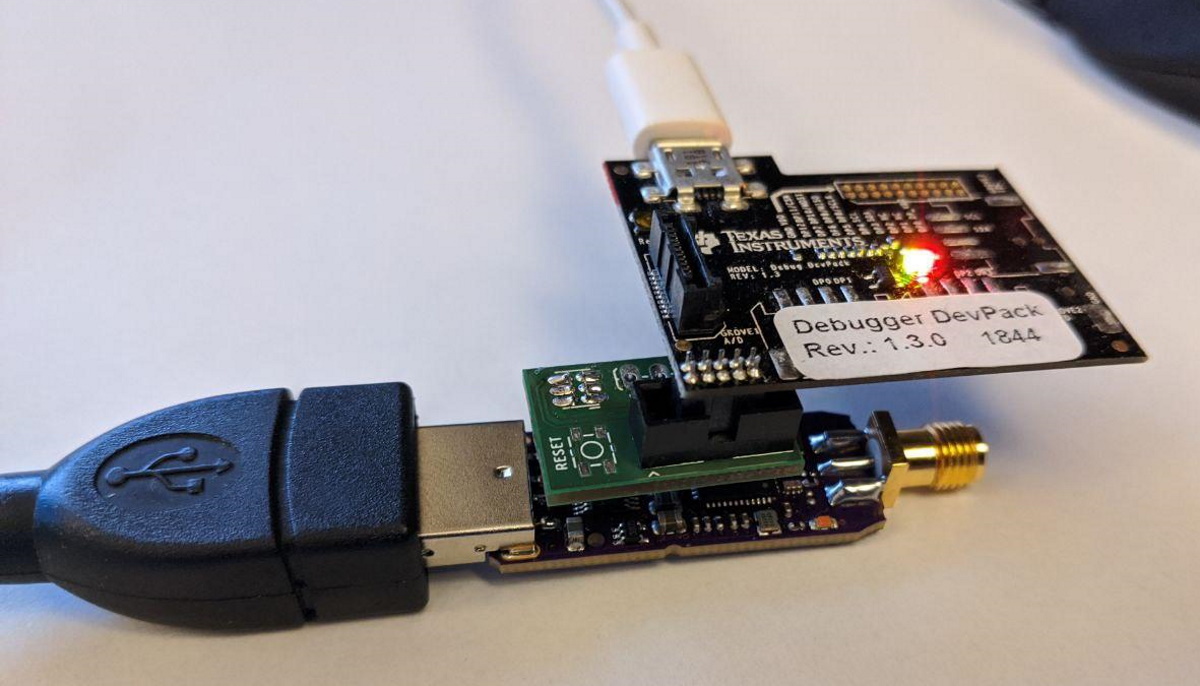
zzh uses a compact five-pin cJTAG connector:
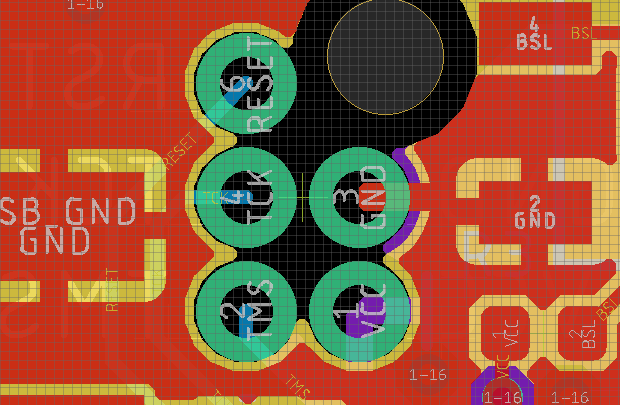
The Debug-Adapter design converts it to the standard 10-pin Cortex layout. A TI XDS110/CC-DEVPACK-DEBUG or a J-Link model with cJTAG support can erase and program the CC2652R.
The TI CC-DEVPACK-DEBUG's 10-pin header exposes the following power, ground, reset and cJTAG signals:
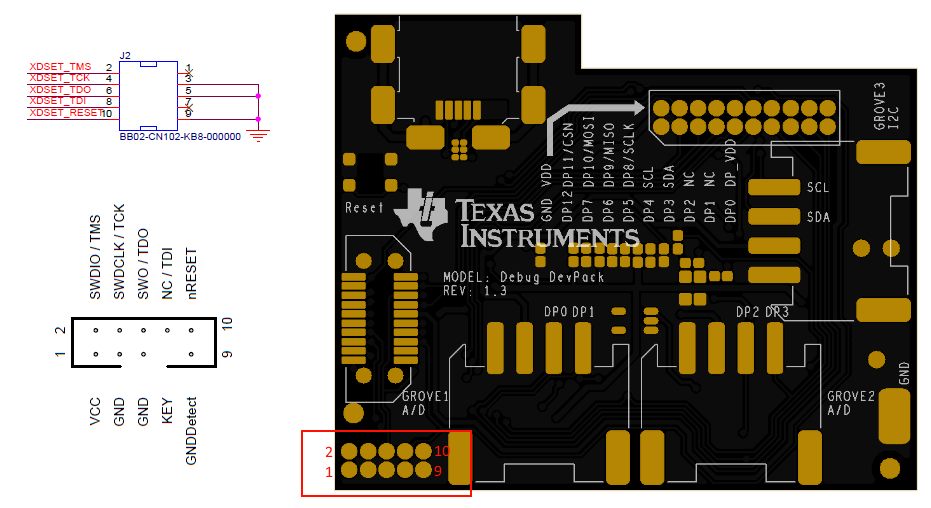
zzhp revision B3 and later exposes the full JTAG signal set. Select the exact target device, erase it and program the image specified for the board in the upstream tested-adapter table.
Repeated USB disconnects
If Linux logs repeated disconnect/reconnect events, check host power and electrical noise:
- Use a suitable host power supply.
- Move the radio away from USB-to-SATA adapters and external storage.
- Try a shielded extension cable or powered USB 2 hub.
- Remove other USB devices temporarily to isolate the fault.
Once the serial transport and coordinator firmware are stable, move to Zigbee Troubleshooting for network-level problems.